
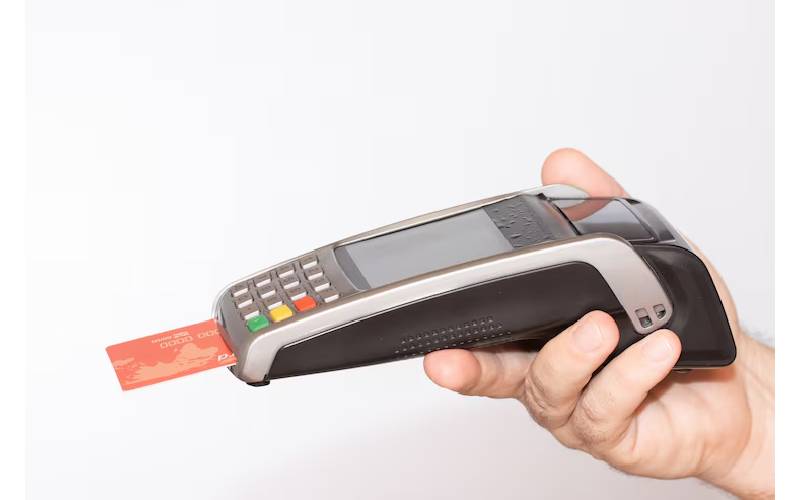
Setting up a card payment machine in the UK starts with choosing the right type of device for your business, whether it’s a countertop, portable, or mobile unit. Next, you’ll need to pick a reliable payment provider like Barclaycard or Worldpay and sign up for a merchant account. Once you have the machine and account ready, connect it to power and ensure it has an internet connection via Wi-Fi, Ethernet cable or mobile data depending on the model. Follow prompts to register your business details and merchant ID on the device. Finally, carry out a test transaction to confirm everything works before accepting real payments daily.
What Is a Card Payment Machine and How It Works
A card payment machine in UK by businesses to process electronic payments made with debit or credit cards. It works by securely reading card data through various methods such as chip & PIN, magnetic stripe, contactless payments, or mobile wallets like Apple Pay and Google Pay. When a customer taps, inserts, or swipes their card, the machine encrypts the card information to protect sensitive data and sends it over an internet connection to the payment processor for authorisation. This communication happens in real-time, allowing the payment network to quickly approve or decline the transaction. Once approved, the machine confirms the payment and can provide a receipt either by printing it or sending it via email. These machines can operate as standalone units or be integrated with a point-of-sale (POS) system, linking transactions to the business’s merchant account, which is connected to their bank account. Before first use, the device usually requires registration and configuration with the payment provider to ensure it’s properly linked and ready to accept payments.

Different Types of Card Payment Machines in the UK
In the UK, businesses can choose from three main types of card payment machines, each suited to different needs. Countertop machines are fixed devices typically connected via Ethernet or Wi-Fi, making them ideal for retail shops or hospitality counters where mobility is not required. These machines often feature larger screens and keypads, providing ease of use for both staff and customers. Portable machines, on the other hand, run on batteries and connect through Wi-Fi, Ethernet, or SIM cards, offering flexibility to move around within the premises. They usually come with a charging base and are convenient for businesses that need to process payments at various locations on site, such as cafés with outdoor seating. Mobile machines are the most compact and link with smartphones or tablets via Bluetooth or dedicated apps. These rely on the phone’s internet connection and are perfect for businesses on the move, like market stalls or delivery services. Some devices support multiple connectivity options, ensuring continuous operation even if one connection fails. When choosing a machine, factors such as business size, location, transaction volume, and mobility requirements are important to consider. Features also vary, including receipt printing capabilities, battery life, and software integration. UK providers commonly offer both rental and purchase options, allowing businesses to select what best fits their operational needs.
How to Choose the Right Provider and Device
Choosing the right card payment provider and device is crucial for smooth transactions and customer satisfaction. Start by selecting a well-known provider in the UK market such as Clover, Barclaycard, Paymentsave, myPOS, or Worldpay, as these companies have established reputations and reliable support. Consider what type of machine suits your business: countertop models are best for fixed locations like shops or cafes, portable devices are ideal if you need flexibility around a venue, and mobile machines work well when paired with smartphones or tablets for on-the-go payments. Connectivity is another important factor; ensure the device supports Wi-Fi, Ethernet, or 3G/4G SIM cards depending on your internet availability and stability. It’s also essential to check the payment methods accepted by the device, including chip & PIN, contactless cards, and mobile wallets like Apple Pay or Google Pay, to meet customer preferences. Compatibility with your existing POS or accounting software can streamline operations, so verify integration options early on. Review the provider’s fee structure carefully, as charges may include transaction fees, rental costs, and monthly subscriptions which affect your overall expenses. Customer support quality should not be overlooked, prompt and helpful assistance can save time if issues arise. Assess the device’s ease of use, durability, and built-in security features to protect sensitive data and ensure longevity. Additional features like receipt printing capabilities, battery life for portable units, and how frequently software updates are issued can enhance the user experience. Finally, confirm that the provider complies with UK regulations and data security standards such as PCI DSS, which safeguard both you and your customers during transactions.
- Select a provider recognised in the UK market, such as Clover, Barclaycard, Paymentsave, myPOS, or Worldpay.
- Consider the machine type that fits your business needs: countertop, portable, or mobile.
- Look at connectivity options available: Wi-Fi, Ethernet, 3G/4G SIM card compatibility.
- Verify payment methods supported, including chip & PIN, contactless, and mobile wallet payments.
- Check if the device integrates with your existing POS system or accounting software.
- Review fees charged by providers, including transaction rates, rental fees, and monthly subscriptions.
- Assess customer support quality, availability, and responsiveness from the provider.
- Consider the hardware’s ease of use, durability, and security features.
- Look for additional features like receipt printing, battery life, and software update frequency.
- Confirm the provider’s regulatory compliance and data security standards to ensure safe transactions.
What Hardware and Accessories You Will Receive
When you receive your card payment machine in the UK, the main item included is the card payment terminal itself, which varies depending on the provider and model you have chosen. Alongside the terminal, you will typically find charging cables and power adapters or base units necessary to keep the device powered. Thermal receipt paper rolls are supplied as well, matched to the correct size for your specific terminal to ensure smooth printing of customer receipts. Many providers also include supervisor or training cards that help with staff training and allow you to test transactions without processing real payments. Depending on the device’s connectivity, you may get Ethernet or phone line cables to ensure stable network connections. For mobile devices, some providers include SIM cards to enable mobile data access straight away. User manuals or quick start guides come with the package to assist with initial setup and daily operation. Protective cases or stands might be provided based on the model, offering added convenience and security for your device. Instructions on updating software or firmware often accompany the hardware to keep your terminal up to date. Finally, the packaging usually contains warranty information and contact details for support, helping you resolve any issues that may arise during use.
Essential Requirements Before Setting Up
Before setting up a card payment machine in the UK, there are several key requirements to have in place. First, ensure you have a reliable power source: mains electricity for fixed devices or a fully charged battery for portable terminals. Stable internet access is crucial, whether through Wi-Fi (with the network name and password ready), Ethernet cable, or mobile data via a SIM card for machines supporting 3G or 4G connections. You must also have a merchant account established with your payment provider to process card transactions and an active UK business bank account linked to receive payments. Prepare all necessary business details such as your trading name, registered address, and contact information, along with your merchant ID or account number provided by your payment processor. It is important to check if your business requires specific VAT or tax settings for receipts, as many devices allow customisation of this information. Additionally, verify that you hold all relevant permissions or licences to operate card payment terminals legally. Lastly, be ready to comply with data security and privacy regulations throughout the setup and daily use of the device to protect customer information and meet UK standards.
Step-by-Step Guide to Setting Up Your Card Machine
Begin by carefully unboxing your card payment machine and ensuring all components are present and undamaged. Portable devices should be fully charged before first use to avoid interruptions during setup or transactions. Next, connect the device to a power source using the provided adapters or base units, depending on your machine model. For internet connectivity, choose either Wi-Fi, select your network and enter the password, or plug in an Ethernet cable if available. If your machine supports mobile data, insert a SIM card to enable connection wherever needed. Power on the device by holding the power button and follow on-screen prompts to select language and region, typically set to English and the UK. When requested, enter your Merchant ID and log in using the credentials supplied by your payment provider. Proceed to configure essential business settings such as VAT rates, receipt preferences, and your contact details to ensure transactions are correctly processed and receipts are accurate. If you have a portable terminal with a base unit or need to connect to a mobile device, pair them via Bluetooth or network settings as directed on screen. Finally, conduct a test transaction with a small amount, like £1, to verify the machine processes payments correctly and prints or emails receipts as expected. This thorough process ensures your card payment machine is ready for daily use and helps avoid unexpected issues during customer transactions.
How to Connect Your Device to the Internet
Connecting your card payment machine to the internet is a crucial step to ensure smooth and secure transactions. If your device supports Wi-Fi, start by accessing the settings menu, then select your network SSID from the list. Enter the Wi-Fi password carefully, as any mistakes may cause connection errors. For a more stable connection, especially in a fixed location like a retail counter, consider using an Ethernet cable. Simply plug one end into your router or network switch and the other into the card machine or its base unit. Some machines may use a phone line connection; in this case, securely connect the phone cable to both the terminal and the wall socket. For portable devices relying on mobile data, insert an activated SIM card with a valid data plan into the SIM slot. It’s important to check the signal strength on these devices to ensure reliable payment processing. Before you move on, verify that the machine displays a successful connection indicator, this often appears as a network icon or confirmation message. If you encounter issues, try restarting the device or router, as this resolves many common problems. Always keep your network passwords and SIM details secure to prevent unauthorised access. Finally, regularly monitor your connection status during busy periods to avoid any interruptions that could disrupt customer payments.
Registering and Configuring Your Card Machine
Begin by switching on your card payment machine and selecting the language and region settings, ensuring you choose English and the United Kingdom to align with local standards. Next, enter your Merchant ID, which you can usually find on your account documentation or a sticker on the device itself. This ID links the machine to your merchant account for transaction processing. Log in using the credentials provided by your payment provider, including your username and password, to authenticate your access.
Once logged in, input your business details such as your trading name, VAT number, and contact information, which will appear on customer receipts. Carefully configure your receipt settings: decide whether to print receipts, email them, or offer both options. Remember to include any necessary legal or compliance statements required under UK regulations.
Set the correct date and time on the device to ensure all transaction records are accurate; this is vital for bookkeeping and auditing purposes. If you have a portable card machine that pairs with a base unit or connects to a mobile device, follow the prompts to establish this connection, typically via Bluetooth or Wi-Fi.
Adjust your payment preferences by setting default payment options and enabling or disabling certain methods like contactless or mobile wallet payments according to your business needs. Verify your security settings thoroughly, set strong password protection and restrict user access levels to prevent unauthorised use.
After completing all configurations, save your settings. The device may prompt you to restart to apply changes fully; if so, allow it to reboot. Your card payment machine should now be registered and configured, ready to process payments smoothly and securely.
Testing the Device with a Sample Transaction
To ensure your card payment machine is functioning correctly, start by performing a test transaction with a small amount, such as £1, to avoid unnecessary charges. Use a test card provided by your supplier if available, or a real card authorised for small payments. Follow the on-screen prompts to insert, tap, or swipe the card, and enter the PIN if requested. Once the transaction is completed, wait for the approval confirmation on the device screen. It’s important to print or email a test receipt to check that the receipt function works properly. After the transaction, verify that it appears correctly in your merchant dashboard or app, confirming the payment has been recorded. If the transaction fails, carefully review any error messages and try again. Additionally, check that the transaction shows up accurately in your bank account or payment provider’s portal. If your device supports refunds, conduct a test refund to verify the reversal process functions as expected. Should issues persist after several attempts, do not hesitate to contact customer support for further guidance.
Daily Use: Accepting Payments and Printing Receipts
When using your card payment machine daily, you can accept payments through various methods such as chip & PIN, contactless cards, and mobile wallets like Apple Pay or Google Pay. It’s important to keep the device charged or plugged in during trading hours to avoid interruptions, especially for portable machines. Maintaining a stable internet connection is also crucial, as it enables real-time authorisation and quick transaction processing. You can print receipts immediately using the built-in printer or offer to email them to customers, depending on their preference. If a refund or void transaction is needed, these can usually be handled directly on the device or through your payment provider’s online portal. Regularly monitoring battery levels on wireless machines helps prevent downtime by ensuring timely recharging. Keep the terminal clean and free from dust to maintain the efficiency of the card reader, and always store the device safely when not in use to protect it from damage or theft. At the end of each day, review your transaction summaries to spot any discrepancies or issues promptly. Lastly, make sure to update the software or firmware regularly to keep the machine secure and benefit from any new features your provider releases.
Routine Maintenance and Troubleshooting Tips
To keep your card payment machine running smoothly, regularly update its software and firmware. These updates help maintain security features and fix any bugs that could affect performance. Clean the card reader slot gently with a soft, lint-free cloth to remove dust and debris, which can interfere with card reading. If the device becomes unresponsive or slow, try restarting it to refresh its connection to the network. Check all cables, including power and Ethernet, to ensure they are securely connected and undamaged. Verify your internet connection status and switch between Wi-Fi, Ethernet, or mobile data if you suspect connectivity issues. Replace receipt paper rolls with the correct thermal paper size to avoid printing problems. For portable or mobile machines, monitor the battery level closely and recharge before it runs low to prevent interruptions. It’s also good practise to perform a small test transaction regularly, confirming the machine processes payments correctly. Only reset the device to factory settings when absolutely necessary, and always back up important configuration details beforehand. If issues persist beyond these basic steps, contact your payment provider’s technical support for further assistance.
Security Measures for Your Card Payment Machine
To keep your card payment machine secure, place it in a supervised and safe spot, such as behind the counter, where theft or tampering is less likely. Use strong, unique passwords for accessing and configuring the device, and never share these credentials with unauthorised staff. Ensure the machine’s software and firmware are regularly updated to protect against known security vulnerabilities. Avoid connecting the device to public or unsecured Wi-Fi networks; instead, use trusted and encrypted internet connections. Enabling automatic lock or timeout features helps restrict access when the machine is idle. Make sure your device complies with PCI DSS standards, which govern secure card data handling, and encrypt any sensitive data stored on the machine according to provider or regulatory rules. Regularly review transaction logs to spot any unusual or suspicious activity early. If your machine is lost, stolen, or compromised in any way, report it immediately to your payment provider to prevent fraud or unauthorised transactions.
Understanding Costs and Fees Involved
When setting up a card payment machine in the UK, it’s important to understand the various costs involved to avoid surprises. Initially, you may face the purchase price of the machine or opt for rental fees if you prefer not to buy outright. Transaction fees usually take the form of a percentage of each sale, sometimes coupled with a fixed charge per transaction. Additionally, many providers apply monthly service or subscription fees that cover ongoing access to their platform and support. Beyond the machine itself, you might need to budget for accessories like receipt paper rolls or charging docks. Some providers also charge setup or installation fees, especially if the system is more complex or requires professional assistance. The type of payments you accept can influence costs too; for example, contactless payments or mobile wallet transactions might attract different fees. If you deal with international customers, be aware that foreign card transactions often incur extra charges or currency conversion fees. Another factor to keep in mind is contract terms: cancelling your service early can lead to termination fees. Software updates and technical support may be bundled into your monthly charges or billed separately depending on your provider. Overall, it is wise to consider the total cost of ownership, including all these elements, when comparing different payment providers to ensure you choose the most cost-effective solution for your business.
Compliance with UK Payment Regulations
When setting up a card payment machine in the UK, it is crucial to ensure your payment provider is authorised and regulated by the Financial Conduct Authority (FCA). This guarantees that the provider meets strict standards for financial services. You must also comply with the Payment Card Industry Data Security Standard (PCI DSS), which sets out rules to protect cardholder data from theft or fraud. This involves implementing secure methods for storing, transmitting, and processing payment information, such as using encrypted communication channels between your card machine and payment networks. Maintaining confidentiality and security of customer payment data at all times is essential, so staff should be trained on how to handle card details properly and in line with these standards. It is also important to stay informed about changes in UK payment and data protection laws to ensure ongoing compliance. Display any compliance certificates or logos your provider or regulator requires, as this can reassure customers of your commitment to security. In case of any data breaches or security incidents, you must report them promptly following UK regulations. Regular audits of your payment system and processes help identify and resolve any compliance gaps before they become issues. Following these guidelines not only protects your business but also builds trust with your customers.
Where to Find Support and Additional Resources
When setting up your card payment machine, the user manual that comes with your device is an essential starting point, offering detailed instructions for installation and everyday use. If you encounter any issues, the payment provider’s official website typically hosts helpful FAQs and troubleshooting guides tailored to your model. Video tutorials on platforms like YouTube can also be very useful, providing clear, step-by-step visual instructions that make setup easier. For direct assistance, customer support is usually available via phone, email, or live chat, allowing you to get personalised help if needed. Online forums and user communities offer a space to exchange tips and experiences with other business owners using similar devices. Staying informed is easier if you sign up for newsletters or updates from your provider, keeping you up to date with new features or important notices. Additionally, industry websites and government portals can provide valuable advice on compliance and best practises. Many providers offer mobile apps that let you manage your card machine and transactions on the go, adding convenience. If you prefer hands-on help, local IT or payment system specialists can assist with installation or technical problems. Finally, it’s important to regularly check for software updates through official channels to ensure your machine remains secure and operates smoothly.
Frequently Asked Questions
1. What are the essential steps to connect a card payment machine to my business system in the UK?
First, choose a device compatible with your business needs. Then, follow the manufacturer’s instructions to connect it via Wi-Fi, Ethernet, or mobile network. Finally, integrate the machine with your sales system or software to ensure smooth transactions.
2. How do I ensure the card payment machine stays secure during setup and use?
Make sure to use a secure and private internet connection, update the machine’s software regularly, and change default passwords. Position the terminal where customers can see it clearly to prevent tampering and always monitor the device for any unusual activity.
3. Can I use my card payment machine anywhere in the UK, or are there location restrictions to consider?
Most machines are designed to work across the UK, but connectivity could depend on your chosen network provider. In areas with low signal strength, you might experience delays. It’s best to test the device at your exact location before relying on it fully.
4. What should I do if the card payment machine isn’t accepting payments during setup?
Double-check all connections and ensure the device is powered on. Verify your account setup with the payment provider and confirm that the machine’s software is up to date. If issues persist, consult the machine’s user guide or contact support for assistance.
5. How do I link my card payment machine to receive payment notifications and receipts?
During setup, enable notifications through the device settings or the associated merchant app. Connect it to your email or POS system where receipts are generated. This lets you and your customers get immediate confirmation of payments without extra hassle.
TL;DR Setting up a card payment machine in the UK involves choosing the right type of device (countertop, portable, or mobile) and a reputable provider like Barclaycard or Worldpay. Essential steps include ensuring you have power, a stable internet connection, and a merchant account. The setup process covers unboxing, connecting to the internet, registering the device, and running a test transaction. Daily use involves accepting various card payments, printing receipts, and maintaining the machine. Keep the device secure, updated, and compliant with UK regulations like PCI DSS. Be aware of costs including device fees, transaction charges, and maintenance. Support and resources are available through providers and online guides to help with any issues.

Seth Hatfield, a maverick in the realm of writing, seamlessly weaves tales from the world of construction and beyond. With a unique blend of insight and creativity, he invites readers on a journey through his diverse repertoire of articles.